Zalith Launcher 2
v_2.4.11
Minecraft has become one of the most popular sandbox games in the world, allowing players to build, explore, and create limitless adventures. To enjoy the game smoothly and access different versions with greater flexibility, many players choose alternative launchers. One of the growing names in this space is Zalith Launcher 2.
Zalith Launcher 2 is designed to provide Minecraft players with a convenient and customizable way to launch and manage the game. Whether you are a casual player, a mod enthusiast, or someone who enjoys experimenting with different Minecraft versions, this launcher aims to make the experience simpler and more efficient.
Here, you will find all the essential information about Zalith Launcher 2, including its features, benefits, setup guide, updates, and useful tips to enhance your Minecraft experience.
What Is Zalith Launcher 2?
Zalith Launcher 2 is a Minecraft launcher that makes it easy to install, manage, and play different Minecraft versions from one place.
Designed for both simplicity and performance, it helps players organize game versions, customize settings, and manage resources with ease.
Far more than a standard launcher, Zalith Launcher 2 offers additional features for customization, compatibility, and game management, giving players greater control over their Minecraft experience.
Whether you want to play the latest version, revisit older releases, or explore community-created content, Zalith Launcher 2 provides a convenient and streamlined way to get started.
Key Features of Zalith Launcher 2
Easy Version Management
One of the biggest advantages of Zalith Launcher 2 is its ability to manage multiple Minecraft versions efficiently. Players can switch between versions without dealing with complicated installation procedures.
User-Friendly Interface
The launcher is designed with simplicity in mind. Both beginners and experienced players can navigate menus, manage profiles, and adjust settings without confusion.
Performance Optimization
Zalith Launcher 2 includes options that help users configure performance-related settings. This allows players to optimize their gameplay experience based on their device capabilities.
Custom Profiles
Players can create separate profiles for different Minecraft setups. This is especially useful for users who frequently switch between vanilla gameplay, modded environments, and testing configurations.
Flexible Configuration Options
The launcher offers various settings that allow users to customize how Minecraft launches and operates. These options provide greater control over the gaming experience.
Regular Improvements
As the Minecraft community continues to evolve, launcher developers often introduce updates that improve compatibility, usability, and overall performance.
Download and Install Zalith Launcher 2
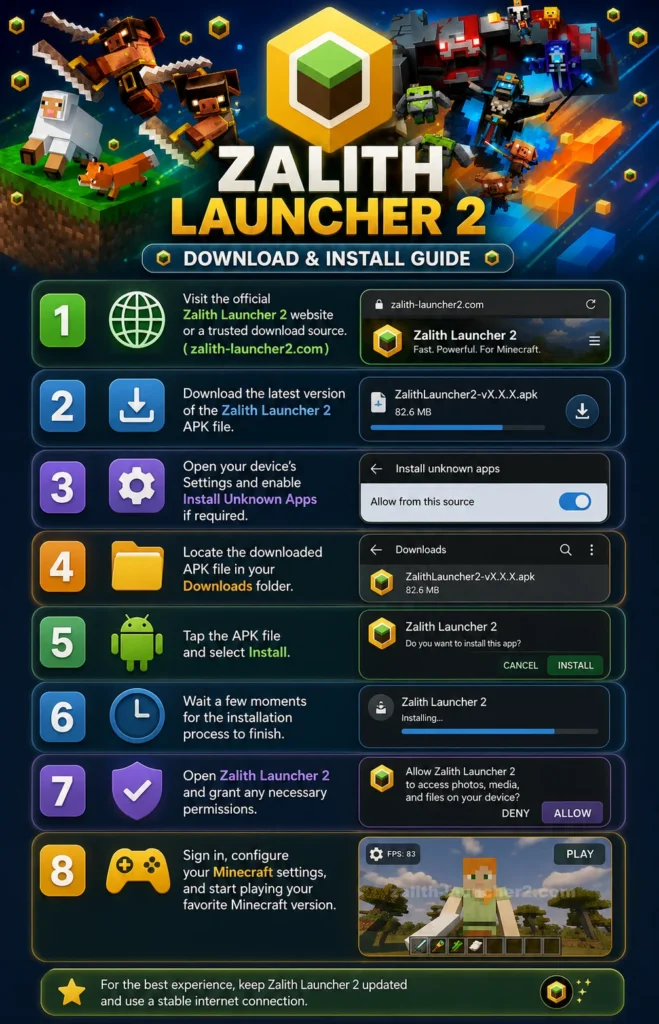
- Visit the official Zalith Launcher 2 website or a trusted download source.
- Download the latest version of the Zalith Launcher 2 APK file.
- Open your device’s Settings and enable Install Unknown Apps if required.
- Locate the downloaded APK file in your Downloads folder.
- Tap the APK file and select Install.
- Wait a few moments for the installation process to finish.
- Open Zalith Launcher 2 and grant any necessary permissions.
- Sign in, configure your Minecraft settings, and start playing your favorite Minecraft version.
- That’s it.
Why Minecraft Players Choose Zalith Launcher 2
Minecraft players often want more than simply launching the game. They look for tools that help improve performance, manage game versions, and create a personalized experience.
Zalith Launcher 2 is used by many players because it offers:
- Easy Minecraft version management
- User-friendly interface
- Enhanced customization options
- Improved performance controls
- Better flexibility for different play styles
- Convenient game profile management
- Simplified launcher experience
These features make it easier for players to spend more time enjoying Minecraft and less time dealing with technical setup issues.
Who Should Use Zalith Launcher 2?
Zalith Launcher 2 is suitable for virtually every type of Minecraft player.
- New Players – Beginners can benefit from the launcher’s user-friendly interface and simplified setup process.
- Survival Players – Players focused on survival gameplay can easily manage and organize their preferred game versions.
- Creative Builders – Builders working on large projects can maintain separate profiles and configurations for different worlds.
- Multiplayer Players – Those who frequently play on servers can switch between required versions more efficiently.
- Advanced Users – Experienced Minecraft players who enjoy customization and testing various setups can take advantage of the launcher’s flexible configuration options.
- Device Compatibility – Zalith Launcher 2 is designed to provide a reliable experience across supported devices while offering tools that help users optimize gameplay based on available hardware resources.
Its efficient design allows players to manage Minecraft without unnecessary complexity, making it a practical solution for a wide range of systems.
Zalith Launcher VS Zalith Launcher 2
| Feature | Zalith Launcher | Zalith Launcher 2 |
| Performance | Good performance | Better optimization and smoother performance |
| Stability | Stable for basic use | Improved stability and reliability |
| Custom Profiles | Limited options | Enhanced profile management |
| Customization | Basic settings | More customization options |
| User Experience | Simple and functional | More user-friendly and intuitive |
| Features | Essential launcher features | Additional features and enhancements |
| Recommended For | Users who prefer the original launcher | Most Minecraft players looking for the latest features |
Zalith Launcher 2 is generally the better choice for most Minecraft players because it offers a modern interface, improved performance, better customization options, and ongoing updates. Zalith Launcher remains a good option for users who prefer the original version or have specific compatibility requirement
Common Issues and Troubleshooting
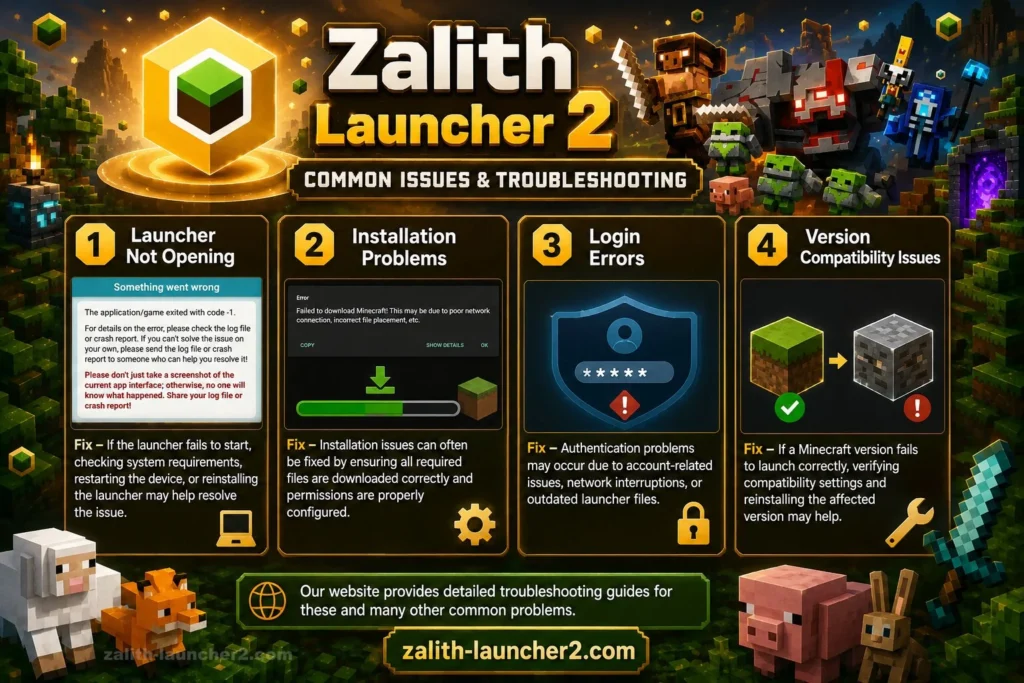
Like any software, users may occasionally encounter technical issues. Fortunately, many common problems can be resolved with basic troubleshooting.
Issues 1: Launcher Not Opening
- Fix – If the launcher fails to start, checking system requirements, restarting the device, or reinstalling the launcher may help resolve the issue.
Issues 2: Installation Problems
- Fix – Installation issues can often be fixed by ensuring all required files are downloaded correctly and permissions are properly configured.
Issues 3: Login Errors
- Fix – Authentication problems may occur due to account-related issues, network interruptions, or outdated launcher files.
Issues 4: Version Compatibility Issues
- Fix – If a Minecraft version fails to launch correctly, verifying compatibility settings and reinstalling the affected version may help.
Our website provides detailed troubleshooting guides for these and many other common problems.
Frequently Asked Questions
What is Zalith Launcher 2?
Zalith Launcher 2 is a Minecraft launcher that helps players manage game versions, customize settings, and improve their overall Minecraft experience.
Why do players use Zalith Launcher 2?
Players use it for its version management tools, customization features, performance options, and convenient user experience.
Can I manage different Minecraft versions?
Yes. One of the main features of Zalith Launcher 2 is the ability to organize and switch between different Minecraft versions.
Final Thoughts
Zalith Launcher 2 has become a popular choice for Minecraft players who want greater control, flexibility, and convenience when managing their game. With its user-friendly design, performance-focused features, and customization options, it offers a practical solution for players of all experience levels.
Whether you’re exploring Minecraft for the first time or looking to enhance your existing setup, Zalith Launcher 2 provides tools that can help make your gaming experience smoother and more enjoyable.
Zalith Launcher 2
Download Zalith Launcher 2 for Minecraft. Manage multiple versions, customize profiles, improve performance, and enjoy a smooth, flexible Minecraft experience.
Price: 0.0
Price Currency: $
Operating System: Android, iOS, PC
Application Category: Game
4.9